



Reading time — 6 min.
36160
A canvas photo collage brings several photographs together in one piece. It can tell the story of a trip, a wedding, a relationship, family gatherings or a child growing up. The aim is not to fit in an entire archive, but to choose pictures that complement each other and remain clear at the finished size.
One canvas, several separate photographs
Each photograph keeps its own scene. The layout connects them through the size, order and spacing of the picture areas. To print each photograph on its own canvas, see arranging several photo canvases. Combining people from separate photographs into a single drawing is a different approach: a family portrait from photographs.
Choose a story and remove repetitive pictures
Describe the theme in one sentence, such as “our seaside trip” or “ten years together”. Select an overview, photographs of people and a few meaningful details. From a series of similar shots, keep the one with the clearest faces, strongest expressions and most suitable framing.
- For travel, combine a location, people within it and a distinctive detail.
- For a wedding or relationship story, add a shared moment and details of the occasion to the main portrait.
- For family history or a child growing up, use chronological order when the passage of time matters.
The colours do not need to match exactly. However, a very dark or strongly saturated photograph may draw more attention than your intended focal picture. Compare the images side by side before choosing a template.
A focal picture or an even grid?
Give an especially meaningful photograph a larger space and arrange supporting pictures around it. An even grid can suit a sequence of events, giving each photograph similar visual weight. Choose the layout around the pictures, rather than cropping out important details to force them into unsuitable cells.
Try an arrangement in the online photo collage editor. A wide group photograph generally needs a wide cell, while a vertical portrait suits a taller one. Review every picture, not just the number of spaces in the template.
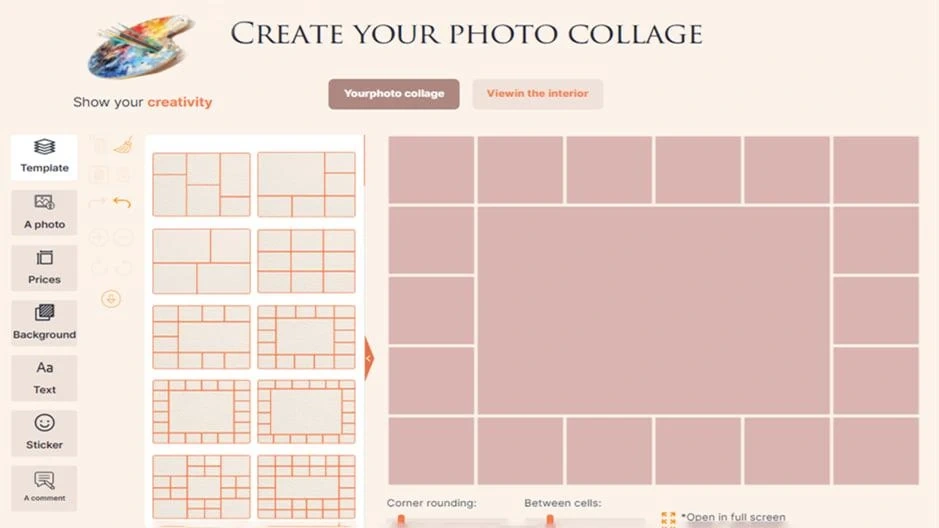
View the screenshot at full size — scroll horizontally
Match the number of photos to the print size
There is no ideal number for every collage. More cells on the same canvas mean smaller photographs. Take particular care with group shots: a face may occupy only a small part of an already small cell.
As a calculation example, not a promise of an available format, a three-by-three grid within 60 × 40 cm gives each cell about 20 × 13 cm before gaps and margins are deducted. Consider how large the faces will appear. If details become too small, reduce the number of pictures, enlarge the focal image or consider a larger available canvas.
Assess the original file and the area left after cropping. A “1000 pixels” threshold alone cannot establish suitability: the individual picture’s printed size, sharpness and enlargement matter. Use original files instead of screenshots when available.
Check cropping, order and captions
- Faces, hands and important objects stay inside their cells; details near the outer edge are accounted for in the final canvas presentation.
- Horizons and orientation are correct, with no accidental duplicate photographs.
- The chronology reads in the intended direction, and names and dates are correct.
- Short captions are legible against the background at the planned size, not just when enlarged on screen.
- The whole layout and every individual picture have been checked.
What to prepare before ordering
Keep the original files together and mark the main picture, preferred sequence and exact wording. See examples and available options for photo collages on canvas. Check the size, presentation, additional services and expected receipt date for your specific order before paying.
A successful collage does not need many photographs. A clear story, recognisable faces and a layout suited to your pictures matter more.